Itta Planner: Calendar & Diary

Plan the day.
Keep the moments.

One app for your calendar, tasks, habits, journal and the dates you never want to miss.
Every piece of your day, in one place.

Download on the App Store
QR code that opens Itta Planner on the App StoreScan with your iPhone camera to open the App Store.

Free on the App Store / iPhone · iPad · Apple Watch / iOS 18 or later

YOUR DAYS,
CONNECTED.
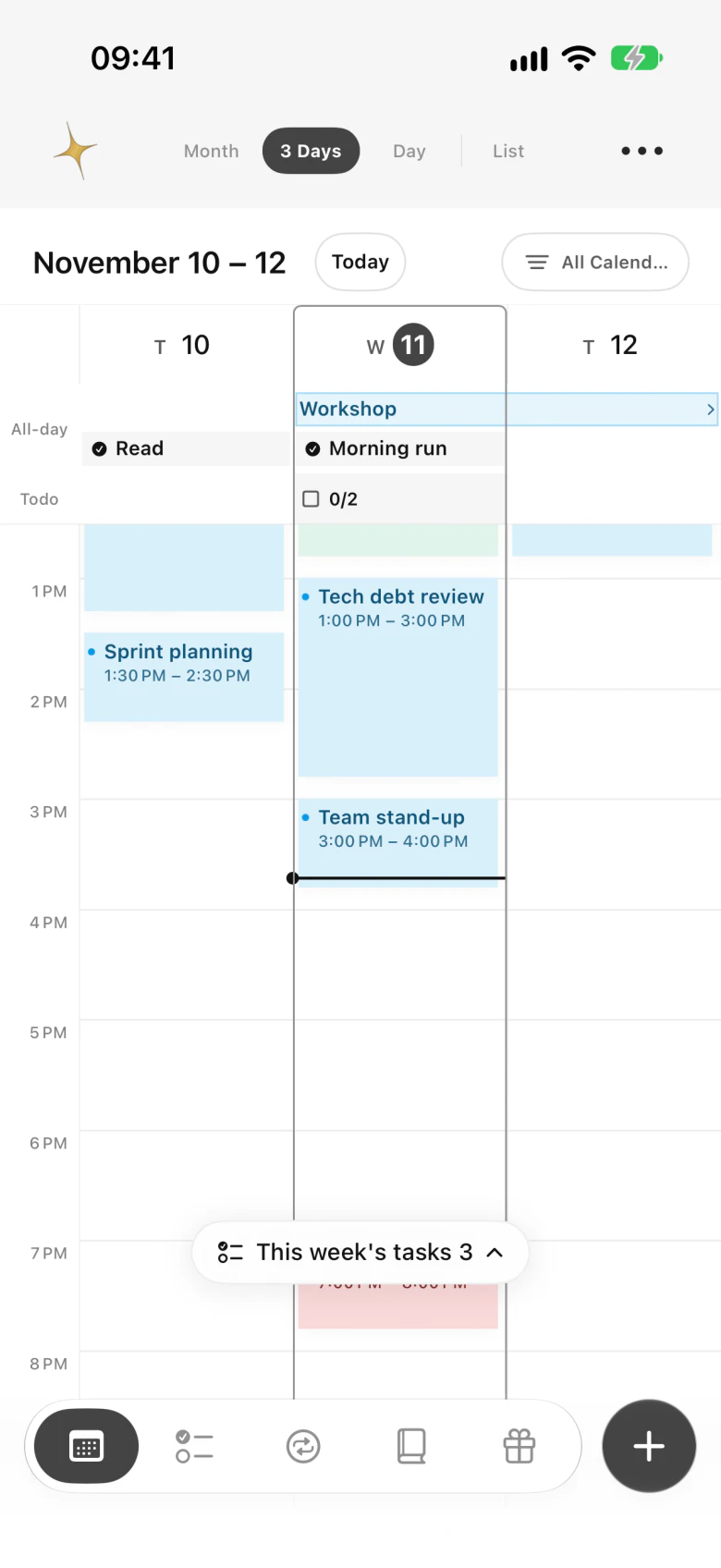
Itta 3-day view showing appointments side by side
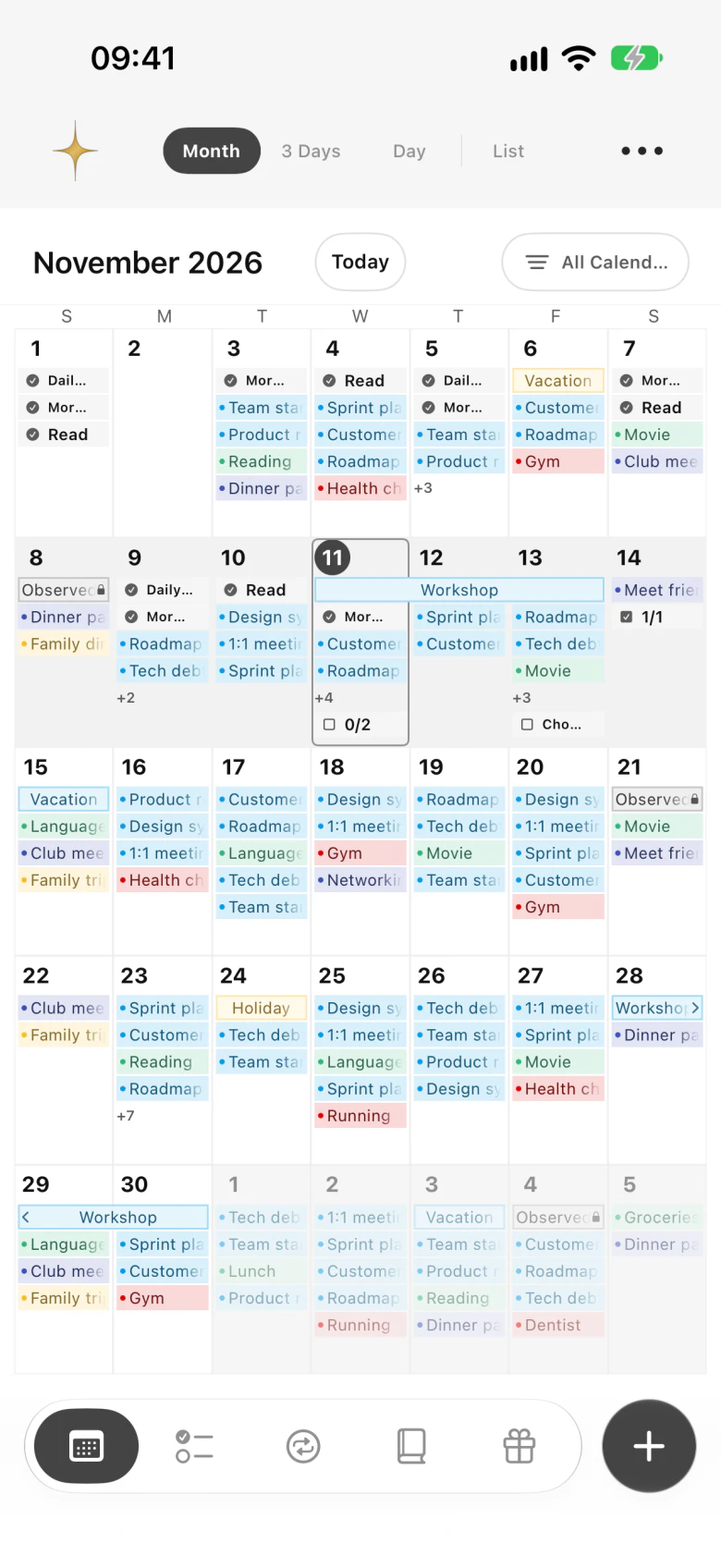
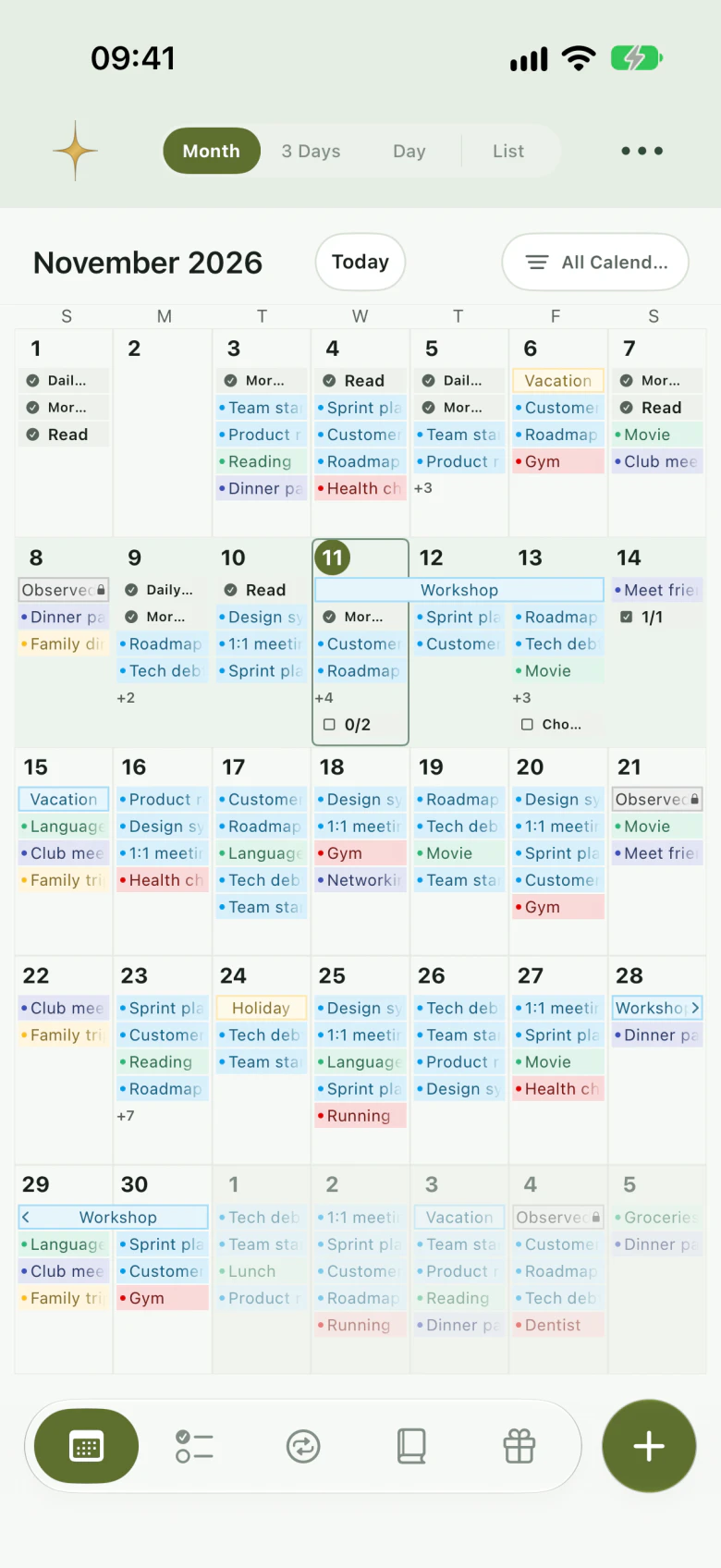
Itta month calendar with events, routines and tasks
Real app screens · sample data

01No account needed

02The essentials are free

03Your records stay yours

The short answer.

Itta Planner is an all-in-one planner for iPhone and iPad. It keeps your calendar, tasks, routines, journal and anniversaries in one app, and it reads and edits the calendars already on your device, such as iCloud, Google or Exchange accounts added in Settings, so you never have to move your events. It also includes class timetables, shift schedules, a circular daily plan, world time and Home Screen widgets. On iPad, a planner desk, a focus board and an Apple Pencil handwriting journal share one screen. You can start for free without an account and choose itta Plus when you want more room, every widget and every theme.

Devices
iPhone and iPad with iOS or iPadOS 18 or later, Apple Pencil supported. Your current and next event on Apple Watch
Languages
English, Korean, Japanese, Simplified Chinese, Traditional Chinese and Spanish. It follows your device language
Price
Free download. Optional itta Plus: monthly or yearly subscription, or a one-time lifetime purchase
Calendars
Works with every account connected to Apple's calendar system: iCloud, Google, Exchange, CalDAV and subscriptions
Your data
Tasks, routines, journal and settings stay on your device and in your private iCloud, with automatic backups
Where
On the App Store in many countries and regions, including the U.S., U.K., Canada, Australia, Japan, Korea, Taiwan, Hong Kong, Singapore, Spain and Mexico (checked November 11, 2026)

Plans and memories,
side by side.

From planning in the morning to looking back at night,
each tool sits right next to your calendar.

Itta month view with events, routines and tasks

See the month,
then zoom into the busy days.

Switch between month, 3-day, day and list views, or pinch to move between them. Your iCloud, Google and Exchange calendars appear as they are.

  • Recurring events, alerts and search
  • Unlimited visibility presets for work, family or school
  • Touch and hold empty time in 3-day or day view to add an event, drag its edges to change the length
  • Other cities' times right under an event
How the calendar works
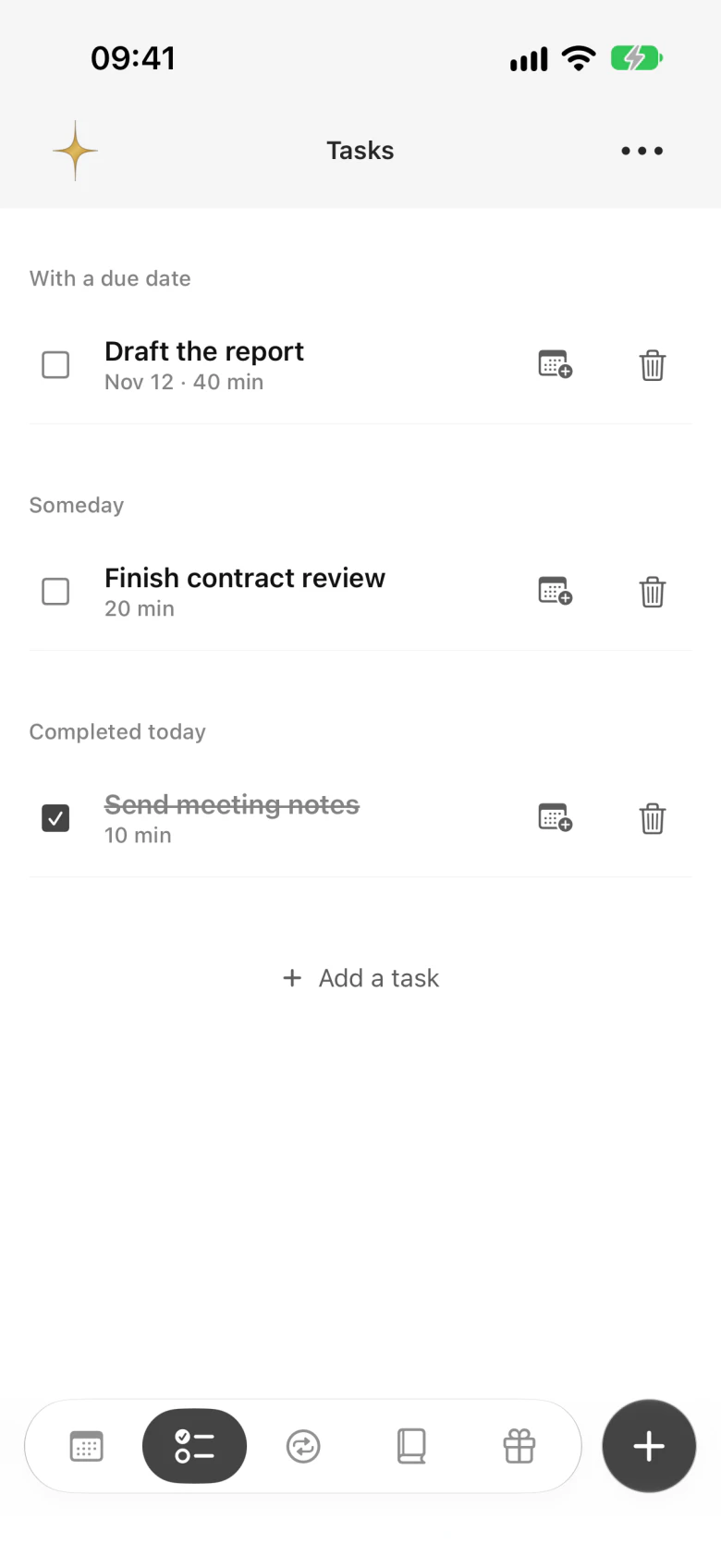
Itta task list with tasks that have a due date, someday tasks and tasks completed today

Write it down.
Put it on the clock.

Write tasks as sentences. "Submit report by Friday" sets the deadline for you. When you have a free hour, drag a task from the drawer in 3-day or day view onto the time, and swipe right to finish it.

  • Tasks with a due date and someday tasks
  • Touch and hold to reorder, or drop into another group to change the date
  • Unlimited tasks on the free plan
Tasks in the user guide
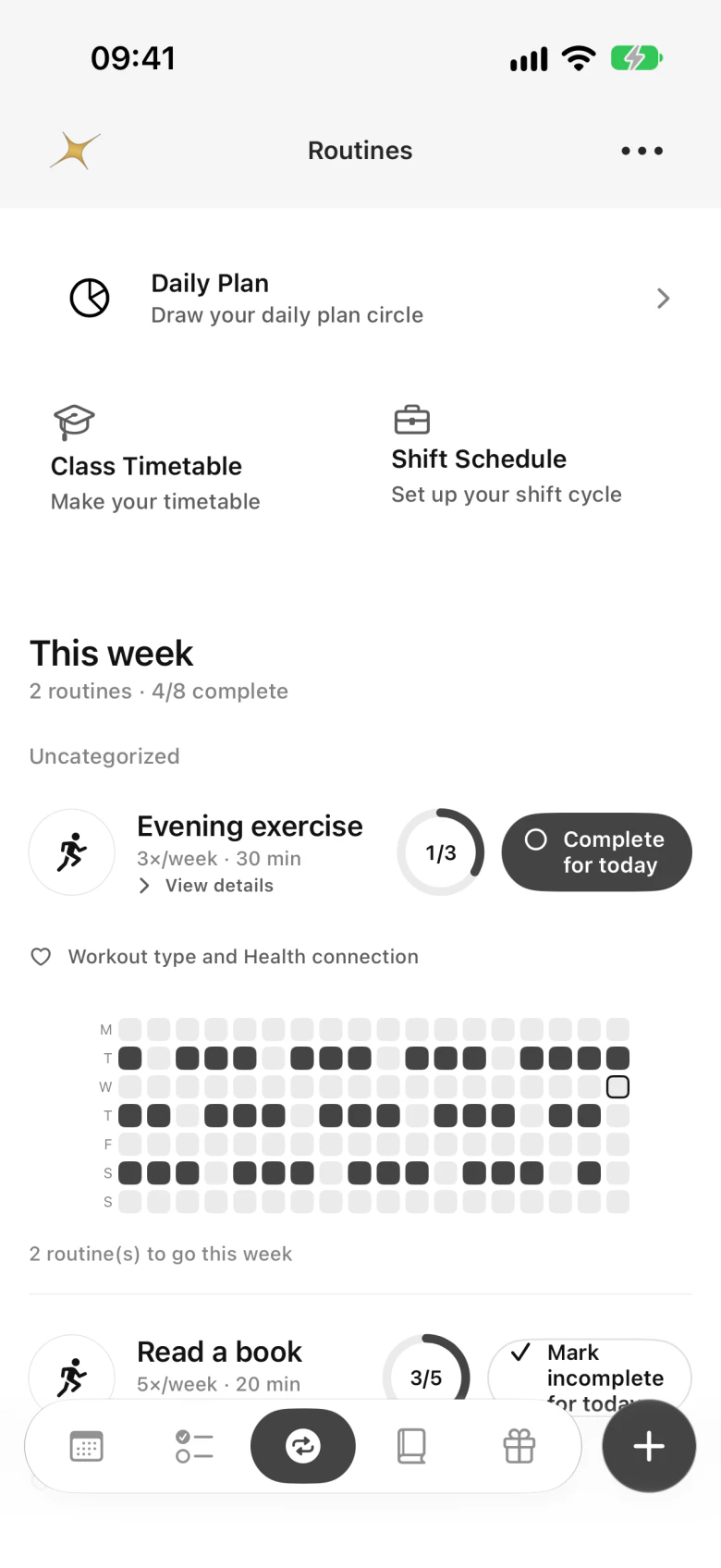
Itta routines with this week's progress and history

A little, often.
In the direction you choose.

A few pages of a book, a short walk, a glass of water. Set the habits you want to keep and check them off each day.

  • Every day, chosen weekdays or a few times a week
  • Check off today right from the calendar or the Today panel
  • A contribution-style history that fills in over time
Routines in the user guide
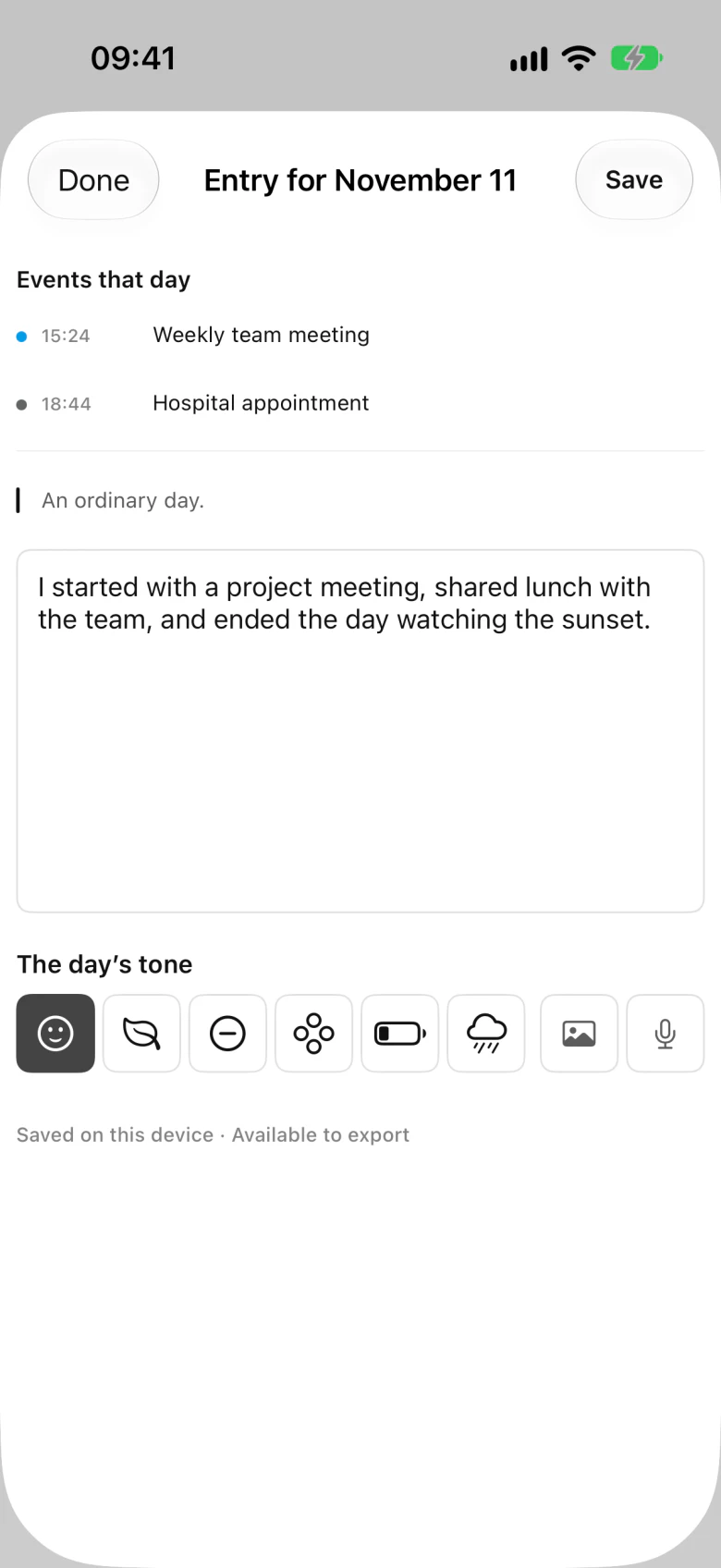
Itta journal entry with the day's events, text and tone

The part of the day
your calendar doesn't hold.

Write freely or answer guided prompts, choose the day's tone and add a photo. The day's events sit right above your entry, so plans and memories stay together.

  • Free writing or guided prompts
  • Photos, moods and voice notes
  • "This week in itta" and "Your year in itta" recaps
Journal in the user guide
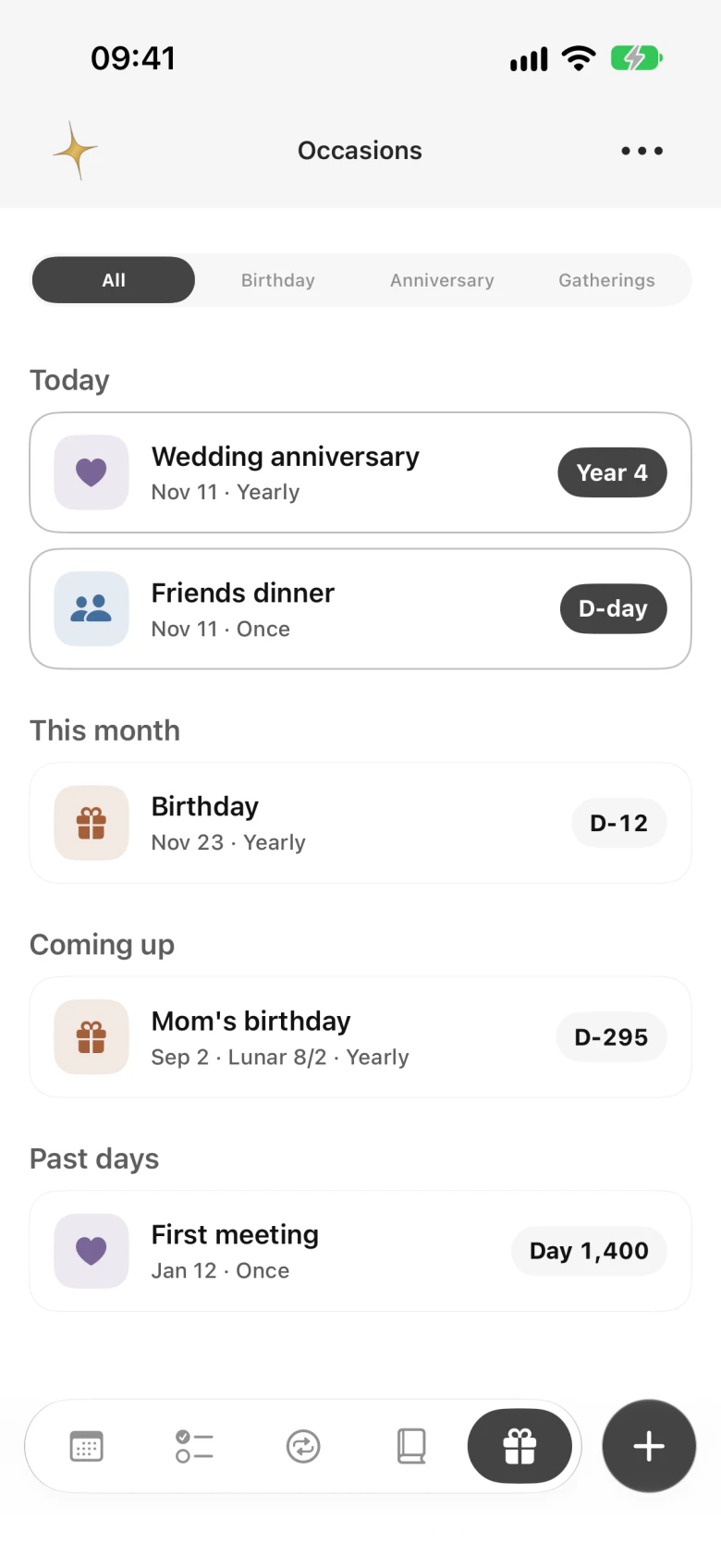
Itta occasions with countdowns to birthdays and anniversaries

Remember the days
that matter.

Family birthdays, the day you met, a trip you're counting down to. See how many days are left and get a reminder in time.

  • Solar and lunar dates that repeat every year
  • Countdowns and reminders
  • Shown on the calendar next to your events
Occasions in the user guide

All screens are real app captures with sample data.

Your whole week,
on one screen.

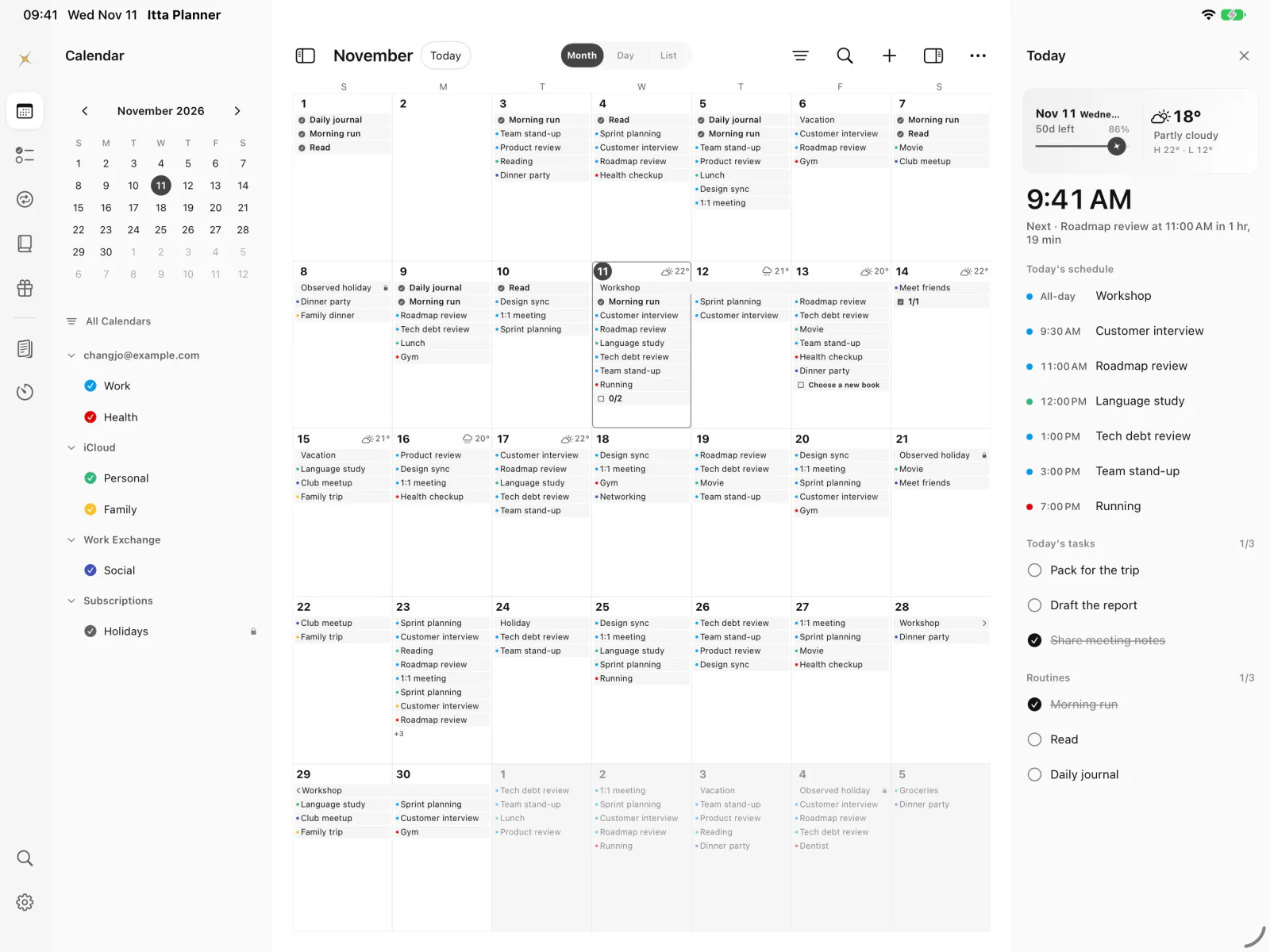
Pick a section from the icon rail on the left, see its list next to it,
the calendar in the middle, and what's next in the Today panel.
Plan and look back without jumping between screens.

iPadOS 18 or later · Apple Pencil supported

Itta on iPad with the icon rail, calendar list, month calendar and Today panel on one screen
Real iPad app screen · sample data
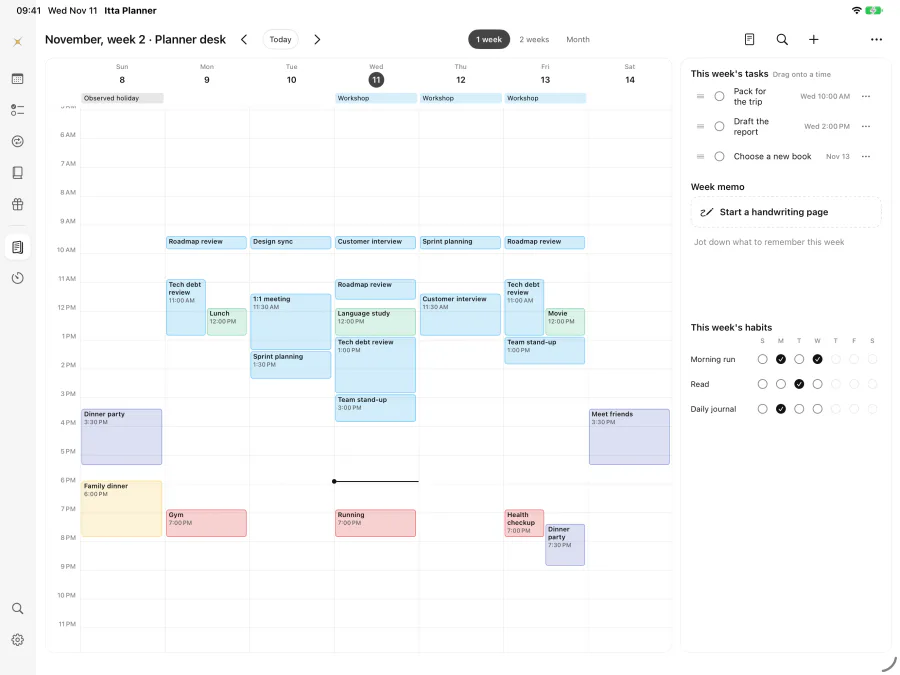
  • Planner desk with the week's schedule next to this week's tasks, a weekly note and habits

    Planner desk

    Spread out the week and drag a task onto the time you want. It becomes an event, with your weekly note and this week's habits on the same screen.

    Free This week · 5 drops a week
    Plus Unlimited drops · 2-week and month spreads · paper styles

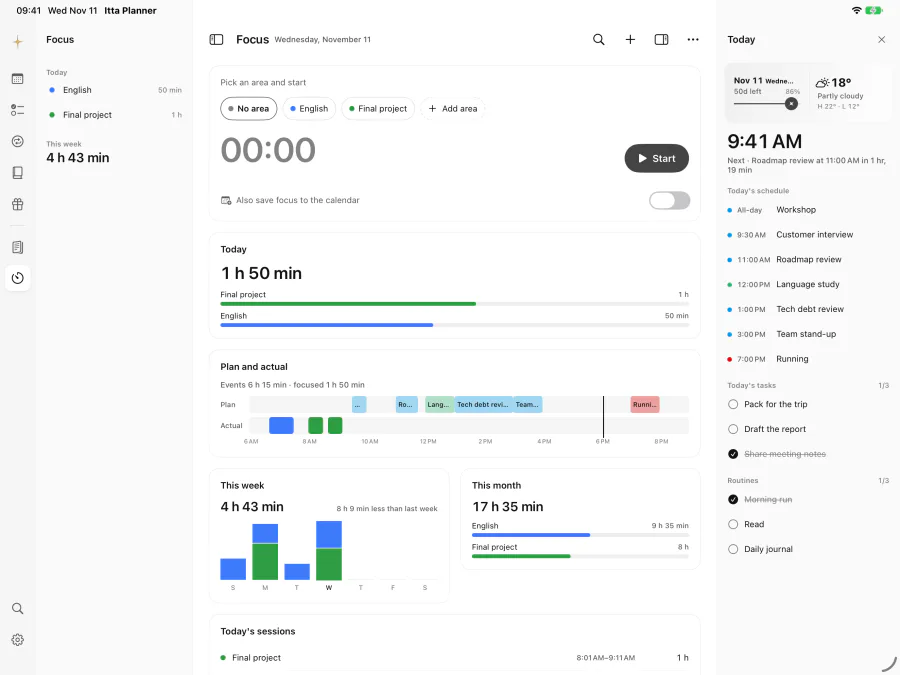
  • Focus board with a timer, planned versus actual time, and weekly and monthly totals

    Focus board

    Pick a category and start the timer. Your actual focus time lines up next to the events you planned, with weekly and monthly totals.

    Free Timer · 2 categories · today's log
    Plus Unlimited categories · plan vs actual · stats

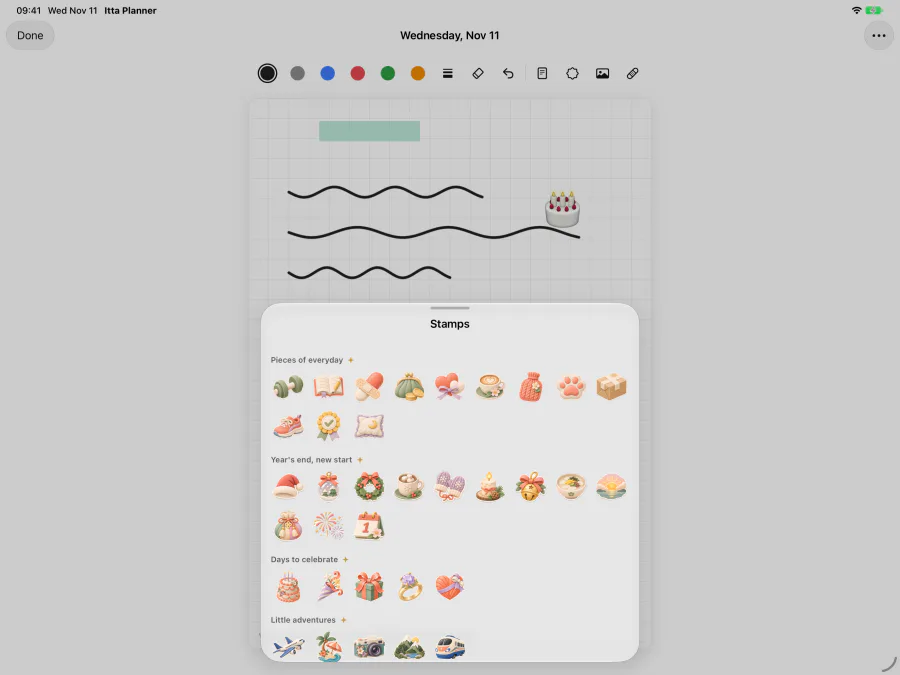
  • A handwritten page on grid paper with the illustrated stamp picker open

    Apple Pencil · handwriting journal

    Draw down an empty time slot to create an event, or strike through a task to finish it. Write the day's entry by hand and decorate it with stamps.

    Free Pencil strokes · 2 pages a week · emoji stamps
    Plus Unlimited · pen colors and widths · illustrated stamps, photos, tape

Keep going on iPhone,
with the task drawer and swipe to finish.

For your first 7 days, the desk, focus board
and handwriting journal include the Plus features.

School, shifts,
and everything around them.

Tools for the days that repeat sit right next to your calendar.
Each card opens the matching part of the user guide.

Ready in a minute.

No sign-up form and nothing to import.
Itta starts from the calendars already on your device.

  1. Download Itta Planner

    It's free on the App Store for iPhone and iPad with iOS 18 or later. You don't need an account.

  2. Allow calendar access

    Your iCloud, Google and Exchange calendars appear right away. If some are missing, Itta shows where to turn them on.

  3. Make it yours

    Add a task, set a routine, write today's entry and pick a theme. Use the same Apple Account on your iPad to keep everything in sync.

The essentials are free.
Plus gives you more room.

Everything you need to plan each day stays free.
Choose itta Plus when you want to keep more and make it yours.

FREE

Everything you need daily

No account, no purchase required.

  • Create, edit and delete events, with recurrence, alerts and search
  • Month, 3-day, day and list views with unlimited visibility presets
  • Unlimited tasks, public holidays and lunar dates
  • 3 routines and 3 occasions (solar and lunar together)
  • One photo per journal entry and 3 event attachments
  • One class timetable, shift schedule and daily plan
  • Next Event, This Week, Month Calendar and Quick Capture widgets
  • On iPad: 5 desk drops a week, 2 focus categories, 2 handwritten pages a week
  • World time for two cities and today's weather
  • iCloud sync with the 3 most recent backups
  • Neutral and Warm Paper themes, one custom theme and emoji stamps
  • Weekly and yearly recap summaries, and a 7-day taste of smart alerts

Your events and entries stay yours whether or not you use Plus.

ITTA PLUS

More room, your style

Higher limits and the full set of widgets and themes.

  • Unlimited routines, occasions, photos and attachments, plus voice notes
  • Unlimited planner desk with 2-week and month spreads, and plan vs actual focus time
  • Unlimited handwriting pages with pen colors, illustrated stamps, photos and tape
  • Multiple timetables and plans, saving to your calendar, and their widgets
  • Every widget and widget style
  • Tomorrow's and this week's weather
  • Up to 10 world-time cities you can add, reorder and rename
  • 13 themes and the year-end collection, alternate app icons, photo backgrounds and a gold star that shines at the top left
  • Daily smart alerts and departure alerts
  • Create events from photos, and full weekly, monthly and yearly recaps with PDF export
  • 30 backups and date-based restore

Choose a monthly or yearly subscription, or a lifetime purchase. Eligible users get a one-week free trial on subscriptions. Prices in your currency appear on the purchase screen in the app.

Itta calendar with a theme applied

When Plus ends, nothing you created is deleted. Your events, entries, photos and attachments stay viewable, and only new additions beyond the free limits are limited.

Before you start.

More questions?
Visit support

What is Itta Planner?

Itta Planner is an all-in-one planner for iPhone and iPad. It combines your calendar, tasks, routines (habits), a photo journal and anniversaries, along with class timetables, shift schedules and a circular daily plan.

Where can I download it?

Itta Planner is free on the App Store for iPhone with iOS 18 or later and iPad with iPadOS 18 or later. On Apple Watch, you can see your current and next event from your iPhone.

Do I need an account?

No. You can use Itta without creating an account. Calendar access permission is needed to show and edit your events, and iCloud sync follows your Apple Account and iCloud settings.

Does it work with Google Calendar and Outlook?

Yes. Itta uses Apple's calendar system (EventKit), so calendars from accounts added to your iPhone or iPad, including iCloud, Google and Exchange, appear in Itta. Syncing follows each account's settings, and read-only calendars can't be edited.

Some of my calendars don't show up. What should I do?

Itta shows the same calendars as the Calendar app on your device. If no account calendars are on the device, for example after an account was signed out, Itta shows a card that explains how to fix it, with shortcuts to Settings and the Calendar app. You can also open "If Calendars Are Missing" from the calendar filter menu. See the user guide for the steps.

Do my tasks and journal sync between iPhone and iPad?

Yes. With the same Apple Account and iCloud turned on, your tasks, routines, journal, occasions and settings such as your theme sync through your private iCloud, with automatic backups you can restore from. Calendar events sync through their own calendar accounts.

Which languages does it support?

English, Korean, Japanese, Simplified Chinese, Traditional Chinese and Spanish. Quick events understand dates and times written in each of these languages, such as "Team meeting tomorrow 3pm".

What's different on iPad?

On iPad, the icon rail, a list column, the calendar and the Today panel share one screen. You also get a planner desk for dragging tasks onto the week, a focus board that compares planned and actual time, and a handwriting journal. With Apple Pencil, draw down an empty time slot to create an event or strike through a task to finish it.

What happens if I stop using Plus?

Nothing you created is deleted. Photos and files you attached stay viewable. Items beyond the free limits can be viewed and deleted, and only new additions are limited.

Is my calendar content used for analytics?

No. Event titles, notes, locations, attendees, calendar names and the text of tasks, routines and journal entries are not sent as analytics. Usage analytics and crash reports only turn on if you agree in the app.

Free on the App Store · iOS 18 or later

Plan tomorrow.
Keep today a little longer.

Itta Planner: Calendar & Diary
No account needed. Start right away.

Download on the App Store
QR code that opens Itta Planner on the App StoreScan to open it on your iPhone.

For iPhone and iPad · Your current and next event on Apple Watch